Contents
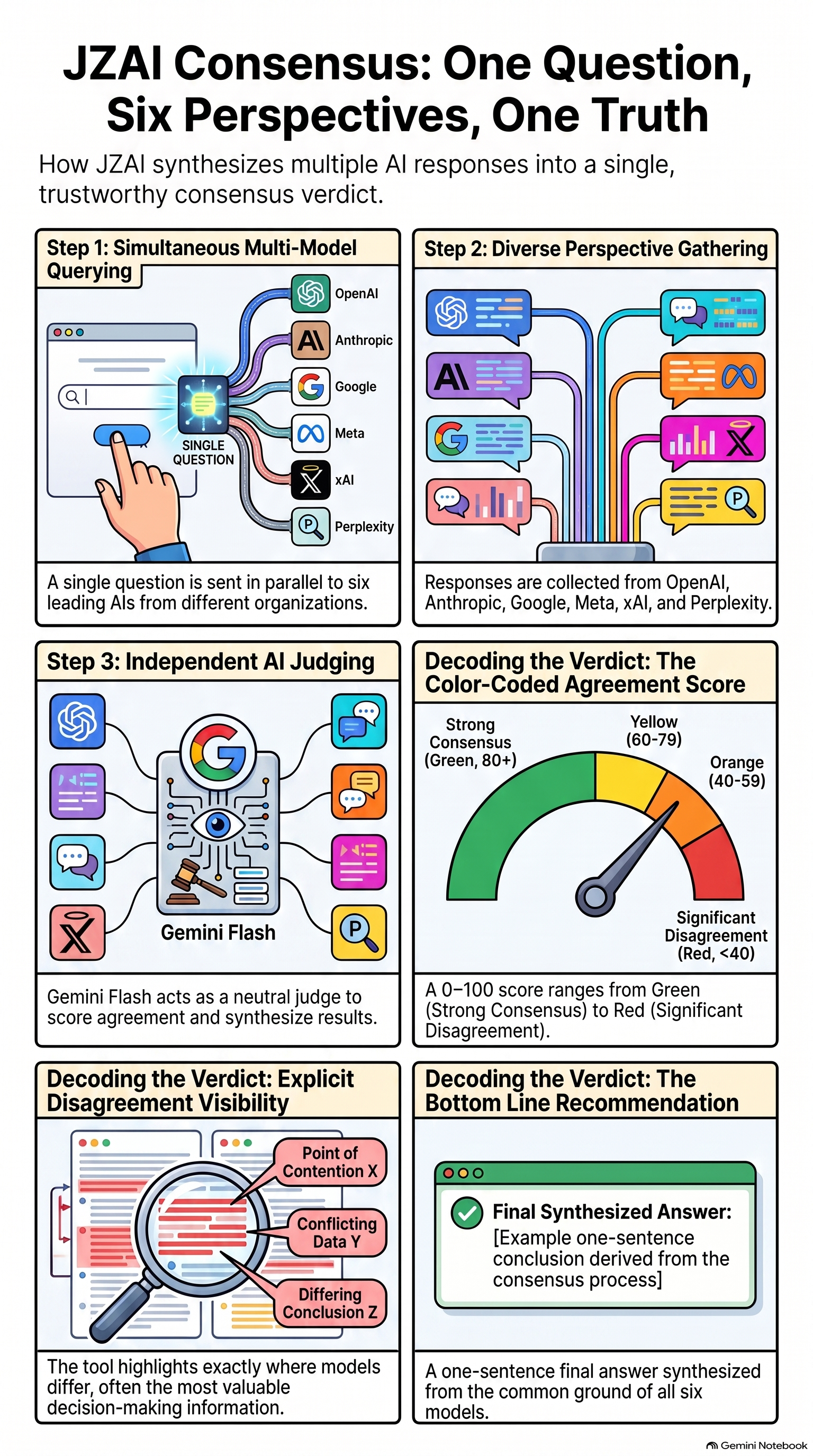
JZAI Consensus Tool is a multi-AI consensus platform that queries six leading AI models simultaneously, scores their agreement, and synthesizes a verdict. For high-stakes questions — medical, financial, legal, technical — cross-model agreement is more reliable than any single AI answer.
Core insight: when independent AI models with different training data, different architectures, and different companies all agree, that agreement is signal. When they disagree, the disagreement itself is valuable — it tells you the question is genuinely contested.
The Six Models
ChatGPT (OpenAI) · Claude (Anthropic) · Gemini (Google) · Meta AI (Meta) · Grok (xAI) · Perplexity Sonar (Perplexity AI). Each brings different training data, reasoning styles, and knowledge sources. Perplexity is the only model with live web access — it searches before answering.
The Judge
Gemini 2.5 Flash scores agreement and synthesizes the verdict. It is not one of the six query models — no conflict of interest. It reads all responses, identifies the plurality position, counts how many models agree, computes the consensus score, and writes the narrative verdict.
What It Is Not
JZAI is not a search engine, not a single chatbot, and not a replacement for professional advice. It is an agreement-detection layer across multiple AI systems. Always verify critical information independently — especially medical, legal, and financial answers.
Step 1 — Ask a Question
Type your question in the Ask box. The more specific and detailed your question, the more useful the consensus. Vague questions get vague answers across six models.
Weak question: "What's good for cholesterol?"
Step 2 — Select Your Models
All six models are active by default. Tap any model pill to toggle it off. Toggled-off models are grayed out and excluded from the query. Use this to:
- Speed up queries by disabling slow models (Gemini Pro takes 15–30s on complex questions)
- Focus on a single model for deep follow-up conversation
- Exclude a model that failed or returned poor results on a prior round
Step 3 — Citations Toggle
Below the text box, a toggle reads "Request citations & sources from each AI." When ON, a citation instruction is appended directly to your question text. Models are instructed to cite specific publications, websites, organizations, or studies for each claim. Citations are model-provided and unverified — cross-check critical claims independently.
Step 4 — Read the Responses
Each AI responds in its own card. Response time is shown in the lower-left corner of each card. Cards are color-coded by AI. URLs in responses are clickable links.
Step 5 — Read the Verdict
After all responses arrive, Gemini Flash scores agreement and writes the verdict. The verdict panel contains:
Step 6 — Follow-Up Actions
Four buttons appear below the verdict:
- Ask a follow-up ↓ — scroll to the follow-up box and type your own question
- Devil's Advocate — auto-fires a challenge to the consensus across all active models
- What would change this? — asks all models what specific evidence would reverse the verdict
- ✕ New question — clears all state and starts fresh
Follow-Up Round Limits
You have 4 total rounds per question session (1 initial + 3 follow-ups in any combination). Devil's Advocate and "What would change this?" each consume one round. Round count is shown as pills in the follow-up bar. Single-AI mode has no round limit.
Phase 2 added eight new capabilities. All are live at ai.johnzur.com as of S9.
F4 — Devil's Advocate: Full Detail
Clicking "Devil's Advocate" fires this prompt to all active models, using the actual verdict text:
Use case: Any time you get a high-consensus answer on a medical, financial, or legal question, run Devil's Advocate before acting on it. A 100% consensus that statins are first-line for LDL may still overlook statin-intolerant patients, low-risk primary prevention populations, or newer agents with incomplete trial data. Devil's Advocate will surface those gaps.
F8 — What Would Change This?: Full Detail
Fires this prompt using the actual verdict text:
Use case: Investment or business decisions. If the consensus is "buy index funds over active management," ask "What would change this?" — the models will name specific market conditions, time horizons, tax situations, or research findings that would reverse that recommendation for your specific case.
F3 — Outlier Detection: Full Detail
The Gemini Flash scorer is instructed: "If any model raised a point, fact, or piece of reasoning that no other model mentioned, note it explicitly." This surfaces as a "Unique Insight" block in the verdict, styled distinctly from the main sections. If all models covered the same ground, the block does not appear.
Why it matters: In a 6-model query, minority perspectives are often correct. One model citing a 2023 JAMA study that contradicts the consensus is more valuable than five models repeating the same guideline. Outlier detection prevents that signal from being buried.
F15 — Balance Pill: Full Detail
The balance pill in the header fetches GET https://openrouter.ai/api/v1/credits on page load. The response returns total_credits and total_usage. Remaining balance = total_credits − total_usage. After each round, the actual per-call cost (from usage.total_cost in the completion response) is subtracted from the displayed balance. The pill color changes automatically as the balance drops.
The score is computed entirely in JavaScript from exact counts. The model never does math — it only classifies. This prevents score drift.
How the Score Is Calculated
Score Labels (13 exact mappings)
| Score | Label | What It Means |
|---|---|---|
| 100% | Strong consensus | All responding AIs agreed on the same conclusion |
| 83% / 80% / 75% / 67% | Majority agreement | Clear majority agrees — minority dissent present |
| 60% / 50% | Mixed — read carefully | Slim majority or split — read individual responses |
| 40% / 33% / 25% / 20% / 17% | No consensus | No clear majority — models reached different conclusions |
| 0% | No agreement | Every model reached a different conclusion |
| ≤33% with agreement_count ≤1 and 3+ AIs | No consensus — verify independently | Fragmented split — question is genuinely contested. Do not act on this without independent research. |
Why the Same Question Gets Different Scores on Repeat
AI models are non-deterministic. Each call uses temperature-based sampling, so two identical questions to the same model will produce slightly different answers. On factual questions with clear answers, scores are stable. On contested questions (medical treatment choices, investment strategies, political analysis), the score reflects genuine uncertainty — variance from run to run is itself signal.
Outliers (◇) vs. Agreement (✦)
Models whose conclusion matches the plurality winner are marked ✦ (navy). Models whose conclusion differs from the majority are marked ◇ (gray). Outliers are not wrong — they may be the most valuable responses. Always read outlier cards before acting on the consensus.
Medical Decisions
Scenario: You've been prescribed a statin for high LDL. You want to understand the evidence before your next appointment.
- Ask: "What are the evidence-based first-line treatments for high LDL cholesterol in a 67-year-old male with no prior cardiac events, family history of heart disease, and LDL of 145?"
- Enable Citations toggle — each AI will cite specific studies and guidelines
- Read individual cards — note which AIs cite ACC/AHA guidelines vs. newer meta-analyses
- If consensus is 80%+, ask Devil's Advocate — what does the dissenting 20% say?
- Run "What would change this?" — what patient circumstances would change the recommendation?
Financial Decisions
Scenario: You're deciding whether to take Social Security at 62, 67, or 70.
- Ask: "For a 67-year-old male in good health with $800K in retirement assets, what is the optimal Social Security claiming age — 62, 67, or 70 — assuming a 25-year life expectancy?"
- Check score — if 67% or higher, the majority has a clear recommendation
- Run Devil's Advocate — what assumptions does the consensus depend on?
- Ask a follow-up: "How does the answer change if I have a spouse aged 64 with her own benefit of $1,200/month?"
- Check F11 score compare — did adding the spouse information shift the consensus?
Research & Fact-Checking
Scenario: You read a news story claiming a drug interaction is dangerous and want to verify it.
- Ask: "Is there a clinically significant interaction between metformin and ibuprofen in a patient with Stage 3 CKD?"
- Enable Citations — Perplexity will search live medical databases; others will cite training data
- Look for Unique Insight — did any model catch something the others missed?
- If "No consensus — verify independently" appears, take that seriously — this is a genuinely contested area
Finding Local Services
Scenario: Finding a Medicare doctor who accepts Mutual of Omaha Medigap near Bedminster, NJ.
- Ask with full detail: location, insurance type, distance preference, what you need the doctor for
- Perplexity will search live directories — its answer will be most current
- Grok may provide specific names and addresses — always call to verify
- Claude and Gemini tend to explain the process (Medigap = no network restriction) rather than name specific doctors
- Run a follow-up: "Focus only on the specific doctor names and phone numbers the AIs agreed on, and how I confirm they take new Medicare patients"
Technical & Engineering Questions
Scenario: You need to choose a database for a new application.
- Specify your requirements: scale, read/write ratio, consistency needs, cloud provider, budget
- High consensus on technical questions usually means there's a clearly established best practice
- Low consensus means the question is genuinely architecture-dependent — read every card
- Devil's Advocate is particularly valuable here — forces the AIs to name scalability failure modes
The Training tab in the main app teaches effective AI prompting. Five sub-pages, each navigable as a separate destination.
| Sub-Page | What It Teaches |
|---|---|
| Why Consensus? | The rationale for multi-AI agreement vs. single-AI trust. When to use JZAI vs. a single AI assistant. |
| How to Ask | Question structure, specificity, context-loading. The difference between a weak and a strong question with real examples. |
| Reading Results | How to interpret agreement scores, outlier cards, and the verdict sections. What "no consensus" actually means. |
| Advanced Techniques | Model toggling strategy, follow-up sequencing, using Devil's Advocate and "What would change this?" effectively. |
| Limitations | What JZAI cannot do. Training cutoff dates, hallucination risk, when not to rely on AI consensus. |
All API calls route through OpenRouter (openrouter.ai) — a single aggregator for all six models plus the scorer. You pay OpenRouter; they pay the underlying providers. One API key, one bill, one balance.
Per-Query Cost Breakdown
| Model | Approx. Cost/Query | Notes |
|---|---|---|
| ChatGPT (GPT-4o) | ~$0.012 | 950 token budget |
| Claude (Sonnet 5) | ~$0.018 | 1,500 token budget |
| Gemini 2.5 Pro | ~$0.045 | 4,000 token budget — thinking model burns extra tokens |
| Meta AI (Llama 4 Scout) | ~$0.001 | Cheapest model in lineup |
| Grok 4.20 | ~$0.008 | 3,000 token budget — verbose on complex questions |
| Perplexity Sonar | ~$0.005 | Plus $0.004/request for web search |
| Gemini Flash (scorer ×2) | ~$0.004 | 1,500 token budget, runs twice per query |
| Total per full 6-AI query | ~$0.09–$0.15 | Varies by question complexity and response length |
Follow-Up Cost
Each follow-up round carries the full conversation history. By round 4, each model's context includes 3–4 prior exchanges (~5,000 tokens). Cost per follow-up round is similar to the initial query. Devil's Advocate and "What would change this?" cost the same as a standard follow-up.
Balance Management
The balance pill in the header shows your remaining OpenRouter credit. When it turns amber (below $2) or red (below $1), add credits at openrouter.ai/credits before running more queries. The tool will fail silently if the balance hits zero — models return errors and cards show "Unavailable."
Stack
| Component | Technology | Details |
|---|---|---|
| Hosting | Netlify | Auto-deploys from GitHub main branch. CDN-delivered. Free tier. |
| DNS | GoDaddy | ai.johnzur.com CNAME → Netlify CDN |
| Repository | GitHub (private) | johnzur-droid/ai.johnzur.com |
| API Proxy | Cloudflare Worker | jzai-proxy.johnzur.workers.dev — all AI model calls routed through Worker. OR key stored as encrypted Worker secret OR_KEY, never exposed to browser. |
| API Aggregator | OpenRouter | Single aggregator for all 6 models + scorer. Accessed via Cloudflare Worker for model calls; direct (OR_DIRECT constant) for balance/models check. |
| OR Guardrails | OpenRouter Workspace | 7-model allowlist, $5/mo budget cap, API key detection block, Prevent overrides ON, no default fallback. |
| PWA | /sw.js | Network-first HTML, skipWaiting(), clients.claim(). Current: jzai-v69 |
| Fonts | Google Fonts | Inter (UI) + JetBrains Mono (AI responses) |
Cloudflare Worker Proxy
All AI model calls from the browser go to the Cloudflare Worker (jzai-proxy.johnzur.workers.dev) instead of OpenRouter directly. The Worker injects the OR API key server-side (stored as encrypted Worker secret OR_KEY) and forwards the request to OpenRouter. The key is never in the browser for model calls. Origin is locked to https://ai.johnzur.com.
Balance and models-availability checks use the OR_DIRECT constant in index.html, hitting OpenRouter directly. These are read-only calls that do not create charges and do not require the Worker.
Service Worker
The service worker (/sw.js) must be a real file — not a blob URL. Chrome blocks blob SW registration. The cache version must be bumped on every deploy or Safari serves stale assets. Current version: jzai-v69.
Session Architecture
Conversation threads are keyed by model ID, not array index. This means toggling models on or off mid-session correctly threads follow-up questions to the right model — even if the active model lineup changes between rounds.
Deployment Protocol
- All changes committed to GitHub main branch
- Netlify auto-deploys within 30–60 seconds
- SW version bumped in sw.js on every deploy
- Live asset verified via curl content-length check before declaring done
- Playwright tests run against live site (PC Chrome 1440×900 + iPhone 16 Pro WebKit 393×852)
Infrastructure URLs
| Resource | URL |
|---|---|
| Live site | https://ai.johnzur.com |
| Cloudflare Worker proxy | https://jzai-proxy.johnzur.workers.dev |
| Netlify dashboard | app.netlify.com (log in with GitHub) |
| GoDaddy DNS | dcc.godaddy.com → ai.johnzur.com → DNS |
| OpenRouter dashboard | https://openrouter.ai/dashboard |
| OpenRouter credits | https://openrouter.ai/credits |
| Parent site | https://johnzur.com |
Six query models plus Gemini Flash as the independent scorer/synthesizer.
Gemini Flash — Scorer & Synthesizer
google/gemini-2.5-flash — The independent judge. Not one of the 6 query models. Runs two calls per query:
- Scorer: reads all responses, returns JSON with score, per-AI conclusions, outlier names, and unique insight
- Synthesizer: reads all responses, writes the full narrative verdict (Agreement / Key Points / Disagreements / Unique Insight / Bottom Line)
Flash chosen over Pro: faster, cheaper, no conflict of interest. Token budgets: 1,500 for scorer, 1,400 for synthesizer. Combined cost: ~$0.004/query.
Model Timeout
Each model call has a 60-second timeout. If a model does not respond within 60 seconds, its card is marked failed and the round completes with the remaining responses. The verdict is calculated from responding models only. Gemini Pro legitimately takes 25–30 seconds on complex thinking queries — the 60-second timeout gives it full headroom.
Status shows fewer than 6 AIs ready
OpenRouter availability check failed for one or more models on page load. The tool still works with available models. Check openrouter.ai/status for outages. Hard refresh (Ctrl+Shift+R) and reload.
One or more cards spin indefinitely
Each model has a 60-second hard timeout. If a card spins past 60 seconds, the fetch failed silently. Check your internet connection. If the issue is consistent on one specific model, check openrouter.ai/status — the model may be down.
Balance pill shows "…" and doesn't update
The /credits fetch failed. Usually a network issue or transient OpenRouter outage. Reload the page. If the balance shows but is wrong, reload — it fetches live on every page load.
Balance pill turns red unexpectedly
Balance is below $1. Add credits immediately at openrouter.ai/credits. Queries will start failing with "API error" on model cards.
Devil's Advocate or "What would change this?" button is missing
These buttons only appear after a successful verdict render with 2+ responding models. If single-AI mode is active, these buttons do not appear (no consensus to challenge).
Devil's Advocate fires but responses look like the original verdict
The pre-written prompt uses the Bottom Line text from the verdict. If the Bottom Line was vague or generic, the adversarial prompt will be too. Ask a more specific question initially — more specific verdicts produce better Devil's Advocate challenges.
Citations toggle ON but no citations in responses
Citations are model-dependent. Gemini and Perplexity reliably cite sources. Claude explains process without specific citations. ChatGPT and Meta AI cite inconsistently. Grok cites source names but accuracy varies. Perplexity is the most reliable for verifiable citations — it searches live sources.
URLs in responses not clickable
The URL must contain a recognizable domain suffix (.gov, .org, .com, .net, .edu, .io) or start with https://. Bare text like "medicare dot gov" will not be linked. If a URL appears but isn't clickable, the model likely wrote it in an unusual format.
Verdict / scoring not showing
Gemini Flash scorer call failed. Check OR balance and that google/gemini-2.5-flash is available on openrouter.ai/models. The scorer must return valid JSON — if it times out (60s), the verdict panel will not render.
Score always shows 100% (or obviously wrong)
Scorer prompt may have regressed. Verify the SCORER constant in index.html points to google/gemini-2.5-flash and the token budget is 1,500. Score math is computed in JS from the JSON response — the model classifies, JS counts.
Site won't update after a code push
Service worker is caching the old version. The SW version must be bumped in sw.js on every deploy. Hard refresh (Ctrl+Shift+R) or clear site data in browser settings → Application → Storage → Clear site data.
Gemini response takes 20–30 seconds
Expected. Gemini 2.5 Pro is a thinking model. It reasons internally before outputting. On simple questions this is overhead; on complex questions it produces differentiated depth. Response time is shown on the card for transparency.
iOS home screen icon wrong
iOS caches home screen icons aggressively. Delete the shortcut and re-add from Safari. The icon file must be at /apple-touch-icon.png — iOS ignores manifest-embedded icons.
Complete architecture reference, model lineup, cost breakdown, and operational blueprint. Updated through S9.